Samsung makes fast expensive storage but even cheap storage can max out SATA, hence there's no point Samsung trying to compete in the dwindling SATA space.
replies(1):
Going forward, SAS should just replace SATA where NVMe PCIe is for some reason a problem (eg price), even on the consumer side, as it would still support existing legacy SATA devices.
Storage related interfaces (I'm aware there's some overlap here, but point is, there's already plenty of options, and lots of nuances to deal with already, let's not add to it without good reason):
- NVMe PCIe
- M.2 and all of it's keys/lengths/clearances
- U.2 (SFF-8639) and U.3 (SFF-TA-1001)
- EDSFF (which is a very large family of things)
- FibreChannel
- SAS and all of it's permutations
- Oculink
- MCIO
- Let's not forget USB4/Thunderbolt supporting Tunnelling of PCIe
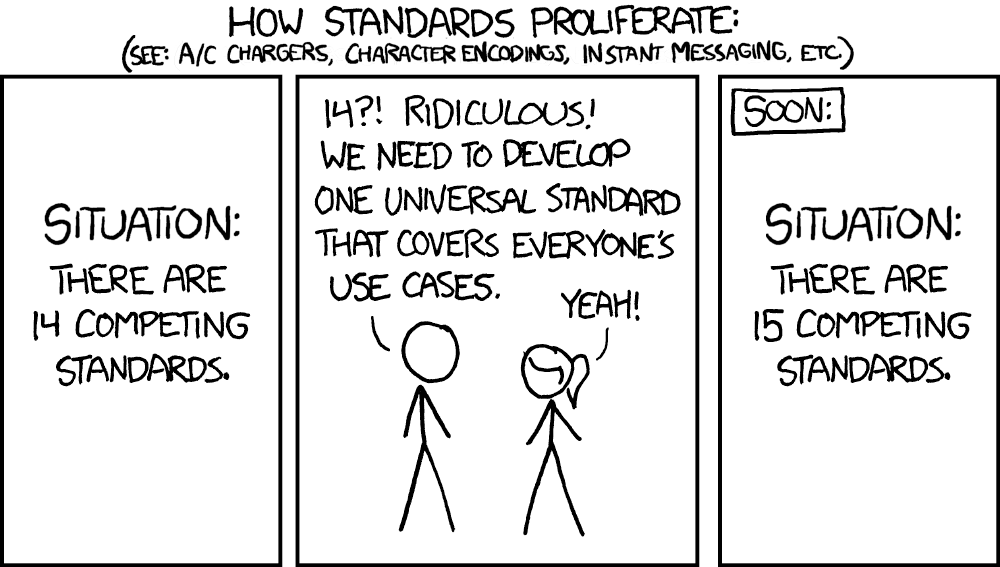
Obligatory: https://imgs.xkcd.com/comics/standards_2x.png
The main problem is having proper translation of device management features, e.g. SMART diagnostics or similar getting back to the host. But from a performance perspective, it seems reasonable to switch to USB once you are multiplexing drives over the same, limited IO channels from the CPU to expand capacity rather than bandwidth.
Once you get out of this smallest consumer expansion scenario, I think NAS takes over as the most sensible architecture for small office/home office settings.
Other SAN variants really only make sense in datacenter architectures where you are trying to optimize for very well-defined server/storage traffic patterns.
Is there any drawback to going towards USB for multiplexed storage inside a desktop PC or NAS chassis too? It feels like the days of RAID cards are over, given the desire for host-managed, software-defined storage abstractions.
Does SAS still have some benefit here?
I wonder what it would take to get the same behavior out of USB as for other "internal" interconnects, i.e. say this is attached storage and do retry/reconnect instead of deciding any ephemeral disconnect is a "removal event"...?
FWIW, I've actually got a 1 TB Samsung "pro" NVMe/M.2 drive in an external case, currently attached to a spare Ryzen-based Thinkpad via USB-C. I'm using it as an alternate boot drive to store and play Linux Steam games. It performs quite well. I'd say is qualitatively like the OEM internal NVMe drive when doing disk-intensive things, but maybe that is bottlenecked by the Linux LUKS full-disk encryption?
Also, this is essentially a docked desktop setup. There's nothing jostling the USB cable to the SSD.
Right now I am overlooking my display and seeing 4 different USB-A hubs and 3 different enclosures that I am not sure what to do with (likely can't even sell them, they'd go for like 10-20 EUR and deliveries go for 5 EUR so why bother; I'll likely just dump them at one point). _All_ of them were marketed as 24/7, not needing cooling etc. _All_ of them could not last two hours of constant hammering and it was not even a load at 100% of the bus; more like 60-70%. All began disappearing and reappearing every few minutes (I am presuming after overheating subsided).
Additionally, for my future workstation at least I want everything inside. If I get an [e]ATX motherboard and the PC case for it then it would feel like a half-solution if I then have to stack a few drives or NAS-like enclosures at the side. And yeah I don't have a huge villa. Desk space can become a problem and I don't have cabinets or closets / storerooms either.
SATA SSDs fill a very valid niche to this day: quieter and less power-hungry and smaller NAS-like machines. Sure, not mainstream, I get how giants like Samsung think, but to claim they are no longer desirable tech like many in this thread do is a bit misinformed.
Once you get to uATX and larger, this could potentially be via a PCIe adapter card too, right? For an SSD scenario, I think some multiplexer card full of NVMe M.2 slots makes more sense than trying to stick to an HDD array physical form factor. I think this would effectively be a PCIe switch?
I've used LSI MegaRAID cards in the past to add a bunch of ports to a PC. I combined this with a 5-in-3 disk subsystem in a desktop PC. This is where the old 3x 5.25" drive bay space could be occupied by one subsystem with 5x 3.5" HDD hot-swap trays. I even found out how to re-flash such a card to convert it from RAID to a basic SATA/SAS expander for JBOD service, since I wanted to use OS-based software RAID concepts instead.
Honestly no idea. Should be doable but with personal computing being attacked every year, I would not hold my breath.
> Once you get to uATX and larger, this could potentially be via a PCIe adapter card too, right?
Sure, but then you have to budget your PCIe lanes. And once you get to a certain scale (a very small one in fact) then you have to consider getting a Threadripper board + CPU, and that increases the expense anywhere from 3x to 8x.
I thought about it lately and honestly it's either a Threadripper workstation with all the huge expenses that entails, or I'd probably just settle for an ITX form factor, cram it with 2-3 huge NVMe SSDs (8TB each), have a really good GPU and quiet cooling... and just expand horizontally if I ever need anything else (and make VERY sure it has at least two USB 4 / Thunderbolt ports that don't gimp the bandwidth to your SSDs or GPU so the expansion would be at 100% capacity).
Meaning that going for a classic PC does not makes sense if you want an internally expandable workstation. What's the point in a consumer board + a Ryzen 9950X and a big normal PC case if I can't put more than two old-school HDDs in there? Just to have a better airflow? Meh. I can put 2-3 Noctua coolers in an ITX case and it might even be quieter.
USB4 is just passing PCIE traffic and should be fine, but at that point you are paying >$150 per usb4 hub (because mobos have two at most) and >$50 per m.2 converter.